How to make a UGC video with AI: choose what is said, by whom and where
How to make a UGC video with AI in four steps: edit the script, choose who is talking and where, then generate. From 10 credits per video.

Making a UGC video with AI no longer means wrestling with prompts and juggling several tools. In Shoptic you build it from your product page and, before generating, you choose what the person says, who says it and where. Each video starts at 10 credits.
A video of someone using your product and talking about it, the way an influencer would, sells: it looks real, it gets the point across in seconds and it works for ads, social media and the product page. The hard part was always making it. You need someone to talk to the camera, then you shoot, edit and redo it when something is off. Or you try several AI tools, each with its own way of asking, until you get something close to what you had in mind.
What is a UGC video? UGC stands for user generated content. It is a short video in which a person uses a product and talks about it to the camera, like a customer or an influencer, in an everyday setting. An AI UGC video has the same format, but the person, the setting and the voice are generated by artificial intelligence from your product photos.
Shoptic is our AI built for ecommerce: we connect to your store, read your products and suggest improvements for every part of the product page, from photos, videos and ads to the copy for Google and related products.
What a UGC video does for your ecommerce store
- Social media ads. In the feed, a video of a person talking looks more like a post from someone you know than an ad. It is the format many brands use for their Instagram, Facebook and TikTok ads.
- Reels, Stories and TikTok. The video comes out vertical 9:16, the format of those screens, or horizontal 16:9 if you need it somewhere else.
- The product page. It shows the product worn or in use, which is what a shopper cannot see in a catalog photo.
- WhatsApp and messages. A 10-second video answers faster than a paragraph when someone asks how it fits or what it is for.
By hand, with several AI tools or with Shoptic
| Shoot it with a person | Several AI tools on your own | With Shoptic | |
|---|---|---|---|
| What you need | Someone to talk to the camera, a phone or camera, lighting and editing | One AI for the script, another for the image and another for the video, and learning how to prompt each one | Your product photos, already in your store |
| How long it takes | Days, between scheduling, shooting and editing | Hours of trial and error | Minutes |
| See the result first | Only after shooting | Only after generating | You see the script and the starting image before generating the video |
| Product matches your photos | Yes | Depends on the tool and how you prompt it | Yes: the video starts from your product page photos |
| Cost per video | The person and the production | A subscription for each tool | 10 credits for Fast and 30 for HD |
How to make a UGC video with AI in Shoptic, step by step
The video comes together in four steps. At each one you see what you will get before spending credits on the video.
1. Choose the product, the UGC style and the accent
On the product page, in the Videos tab, you choose the reference photos, the UGC Testimonial style, the quality (Fast or HD) and the person's accent. If you want, you tell it in your own words what the person should say. For example: "that I wear it for early morning runs and it keeps the wind out". If you leave it blank, the script is written from the product description.
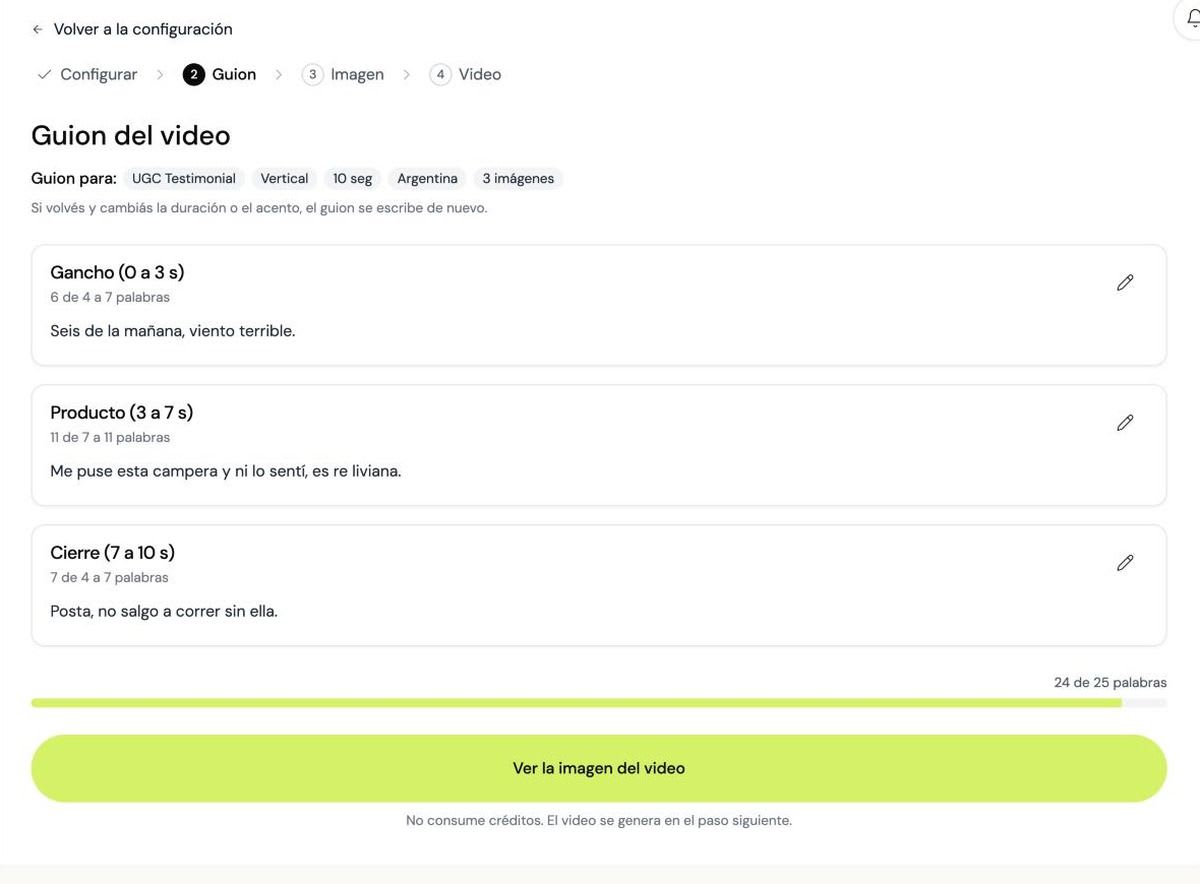
2. Review the script and change anything you like
In seconds you get the script split into three parts, each with its timing: the hook (0 to 3 seconds), the product (3 to 7) and the close (7 to 10). If something does not sound the way you would say it, edit it right there.
3. See how the video starts: who is talking and where
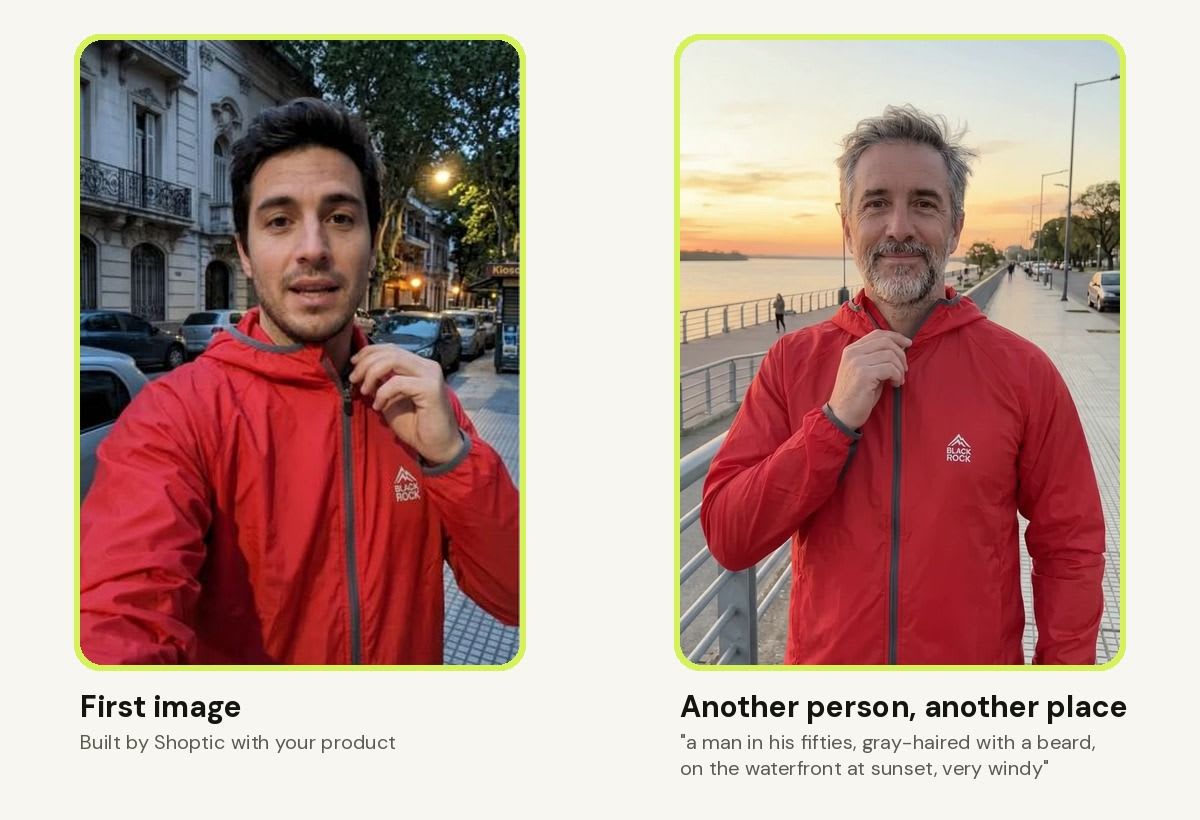
Before the video you see the starting image: the person, the setting and your product. If you want a different person or place, describe it the way you would to someone, typed or with the microphone, and tap "Make another image". In seconds you have the new one. You can try up to three images per script and keep the one you like best.
4. Generate the video
When you like it, generate the 10-second video. The person says the script exactly as you left it, with the accent you chose, and the product looks like it does in your photos. A Fast video costs 10 credits and an HD video, 30. Before, every video cost 50.
How to write a UGC video script that does not sound like an ad
A UGC video works because it feels like a person's opinion, not an ad. In Nielsen's 2021 global Trust in Advertising study, carried out in 56 countries, 88% of people said they trust recommendations from friends and family the most, and messages showing real-life situations were among the best received (Nielsen, 2021). A good script feels like that: someone telling a friend about something that happened to them.
This is the script the AI suggested for the jacket in the tutorial and how it read after editing (the original is in Spanish with an Argentine accent; this is a translation):
| Part | Sounds like an ad | Sounds like a person |
|---|---|---|
| Hook | Check out this amazing jacket! | Six in the morning, crazy wind. |
| Product | I wear the Runn2 Windbreaker for running and it protects me. | Put this jacket on and didn't even feel it, it's so light. |
| Close | Try it yourself at Marathona. | Honestly, I don't go running without it. |
- Start with a real moment, not with the product. The hook has 3 seconds to stop the viewer from scrolling past.
- Speak in the first person and stick to one detail. One concrete detail says more than a list of features.
- Call the product what people would call it. "This jacket", not the full catalog name.
- Close with an opinion, not an order. "I don't go running without it" sounds like a recommendation; "buy it now" sounds like an ad.
- Pick the person and the place based on who buys from you. The same product can have one video with someone young in the city and another with someone older outdoors. Test both and measure which works better in your ads.
For more ideas, read these tips for creating a UGC video with AI. And if you want the same person to appear in your photos and your videos, see how to build your catalog with the same model.
What the tutorial shows
The video opens with the result: a man on the waterfront, wearing a red windbreaker, says (in Spanish) "Six in the morning, crazy wind. Put this jacket on and didn't even feel it, it's so light. Honestly, I don't go running without it." Then it shows how it was made: picking the jacket and the UGC Testimonial style with an Argentine accent, writing what the person should say, editing the close of the script, asking for a different person and place for the starting image, and generating the video from 10 credits.
Your whole product page, not just the video
The video is one part of the product page. We also suggest photos, ads, the title and description, the copy for Google and related products. To see a product page built from start to finish, there is the case study of a product page transformed in 5 minutes, and for the copy, the article on your product page copy for Google and AI search.
Frequently asked questions
What is an AI UGC video?
It is a short video, in the format of someone using a product and talking about it to the camera, where the person, the setting and the voice are generated by artificial intelligence from the product photos. It works for ads, social media and the product page, with no shoot and no one to hire.
How much does a UGC video cost in Shoptic?
A Fast video costs 10 credits and an HD video, 30 credits. Writing the script and seeing the starting image do not use credits. With the 100 credits on the free plan you can make up to 10 Fast videos, no credit card required.
How long is the video and what format is it?
It is 10 seconds long. It comes out vertical 9:16, for Reels, Stories and TikTok, or horizontal 16:9.
Can I change what the person in the video says?
Yes. Before generating you see the script split into hook, product and close, and you can edit each part. The person says the text exactly as you left it.
Can I choose who is talking and where?
Yes. Before the video you see the starting image. If you want a different person or place, describe it in your own words, typed or with the microphone, and generate another image. You can try up to three per script.
What languages and accents can the person speak in?
You choose the person's accent when you set up the video, and the script is written the way people talk there.
Do I need to know about AI or video models?
No. Everything happens on the product page, with guided steps. Shoptic builds the request for the video model from your product, the script and the image you picked.
Make your first UGC video with a product from your catalog → You start with 100 free credits, a free account and no credit card.
Share article: